Patina desktop
Patina desktop is a floating Wayland desktop for Linux and FreeBSD, in the style of Patina apps. It has a compositor, a bar, a launcher, a lock screen, menus and a process manager, and each is its own small program, so one going wrong can be restarted without the others. It also has dictation built in: hold a key, speak, and what you said is typed into the focused window. Screenshots and screen recording are built in too.
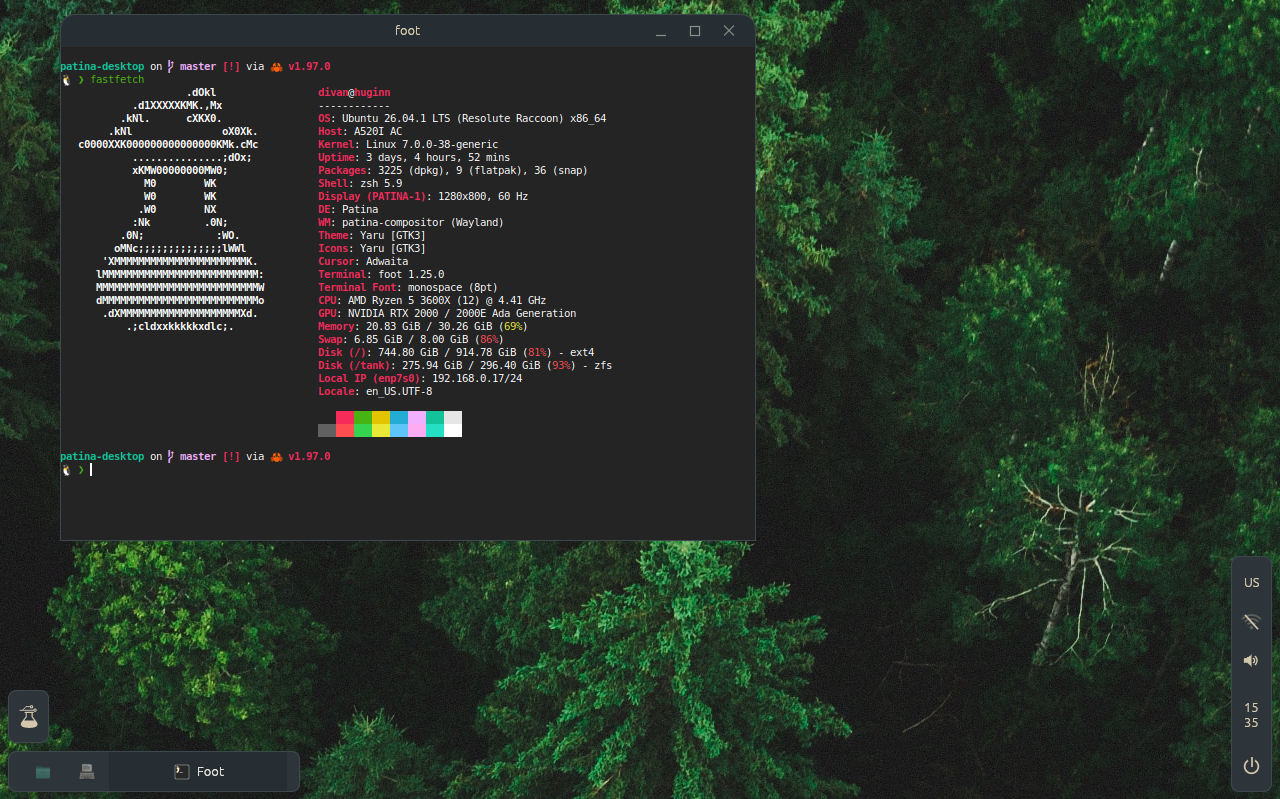
How it works
Windows float. Drag one to an edge and it tiles, or use Super and an arrow. Every window has a tab in the bar, which you can drag to reorder. Minimising sends a window to its tab, and focusing the tab brings it back.
The desktop wears the same skins as the Patina apps. Choose one from the menu you get by right-clicking the desktop, and the bar, menus, lock screen and wallpaper change with the apps. The default wallpaper is the Sector F Labs flask in the skin's colours.
Keys are the desktop's own and are set in a config file that applies within a second. Some can't be taken: Ctrl+Shift+Escape always opens the process manager, and Ctrl+Alt+Shift+Backspace always restarts the desktop without logging out.
Dictation
Hold Ctrl+Super+Alt, speak, and let go. What was said is typed into whatever window has the focus, an editor, a browser, a terminal or a chat. While you hold the key a small overlay shows the microphone's level, and then that it is transcribing.
The speech is transcribed on your machine by Whisper,
through whisper.cpp, and nothing is sent
anywhere. It runs on the GPU through Vulkan where there is a driver for it (Intel, AMD or
NVIDIA), and on the CPU otherwise. The default model is base.en, and any of
whisper.cpp's models can be used instead. The text is delivered through the clipboard, so it
works in apps that know nothing about dictation.
It is also a command on its own: patina-dictate | wl-copy records until you press
Enter and puts the text on the clipboard, and given a WAV file it prints what is said in it.
Getting started has the one extra step it needs, downloading a
model.
Screenshots and recording
Print opens a pill at the bottom of the screen with five choices: the whole screen, the window that was focused, a selection, or recording the screen or a selection. Click one, or press 1 to 5. A selection is dragged out over the dimmed screen, and Escape takes nothing. Super+Shift+3 and Super+Shift+4 take the screen and the focused window at once.
While recording, the pill shows a red dot, the time and Stop, and Print again ends it.
Screenshots go to ~/Pictures/Screenshots and recordings to
~/Videos/Screen Recordings. Recording uses ffmpeg.
The same chooser is what an app sees when it asks to share the screen, in OBS or a browser: a panel lists the screen and the windows, and the app gets only the one you pick. That goes through xdg-desktop-portal-wlr.
What's in it
-
Compositor and session
patina-compositor is built on Smithay. It runs nested in a window on another desktop, for trying a change, or on the hardware as a login session, with fractional scaling, libinput and console switching. The session starts it again if it restarts or crashes. -
Bar
Drawn in egui on a layer-shell surface. It holds the launcher button, pinned apps, a tab for each window, the tray (apps' status icons, keyboard layout, Wi-Fi, volume, battery), the clock and the power button. Which of them appear, and where, is configured. -
Launcher
Opened by the Sector F button or the Super key. It lists installed apps from their.desktopfiles, and folder apps in~/Apps, and filters as you type. -
Menus
Volume, Wi-Fi (through NetworkManager, including captive portal sign-in), the clock with the day's events from the Calendar app, and power: Lock, Log Out, Restart and Shut Down. -
Lock screen
In the bar's skin, with the password checked through PAM. It runs on a key, when the screen turns off and before sleep. -
Screenshots and recording
The Print key's choice of the screen, a window or a selection, or recording one, and the chooser for apps that ask to share the screen. -
Dictation
Hold Ctrl+Super+Alt and speak. Whisper runs on the machine, and what was said is typed into the focused window. -
Settings
The skin, wallpaper, default apps, Night Light, power modes, gaps, the bar's layout, and the desktop's own processes. -
Process Manager
The apps with their windows, every process with what it costs in CPU, memory and disk, and problems found in the kernel's log.
Teleprinter (the terminal), Files, Reader, Notebook, Draw, Montage and UnAmp are installed
with it, each from its own repository. Each program has a man page, and
man patina-desktop covers the pieces, the keys, where settings are kept and how
to recover.
Keys
| Keys | |
|---|---|
| Super | the launcher |
| Alt+T, Alt+B | Teleprinter; Firefox, or its window if it's open |
| Alt+Tab | step along the bar's tabs |
| Super+1–9 | bring a tab forward |
| Super+M, Super+Q | minimise to its tab; quit the app |
| Super+Up/Down/Left/Right | fill the screen, restore, tile to a half |
| Super+Shift+3, Super+Shift+4 | screenshot the desktop, the focused window |
| Ctrl+Super+Alt (held) | dictate |
| Ctrl+Super+Q | lock the screen |
| Ctrl+Shift+Escape | the process manager |
| Ctrl+Alt+Shift+Backspace | restart the desktop |
The full list, and how to change it, is in the README.
Where it runs
| Ubuntu 26.04 | Built, installed and run as a session, on hardware and in virtual machines. This is where it is developed. |
| Debian 13 | Every package exists and it builds and installs in a clean container. Not yet run as a session. |
| Other Linux | Not tried. It asks for libseat with systemd-logind or seatd, Mesa or NVIDIA, and PAM, NetworkManager and PipeWire for the lock screen and the Wi-Fi and volume menus. |
| FreeBSD | Runs in a virtual machine, with battery and Wi-Fi. |
Getting started
To look first without installing anything, run the compositor in a window on your current desktop, with the bar and wallpaper inside it:
git clone https://github.com/Sector-F-Labs/patina-desktop && cd patina-desktop
make run
It needs Rust from rustup (the code is edition 2024), git,
make, a C toolchain and the libraries that make deps lists. The repository also
has Ubuntu and FreeBSD virtual machines (make vm-linux) that touch nothing on
your machine.
To install the whole desktop from source into /usr/local:
make deps                  # lists the packages to build with; install them
make install-full          # builds as you, then installs with sudo or doas
install-full also installs the apps above, each cloned from GitHub and built at
the commit it was tested at, so it needs the network. make install installs the
desktop alone, and make uninstall-full removes what was installed.
The desktop runs a few programs it doesn't ship. On Ubuntu and Debian:
sudo apt install dbus-user-session network-manager wireplumber xdg-desktop-portal \
    xdg-desktop-portal-gtk xdg-desktop-portal-wlr xwayland libglib2.0-bin xdg-utils \
    fonts-noto-color-emoji ffmpeg
On Ubuntu and Debian it can also be one package, built on the machine it's for so its dependencies match that release:
make deb
sudo apt install ./target/deb/patina-desktop_*.deb
Then log out and choose Patina from the session menu (the gear) on the login
screen. GDM is the one tried, and any login manager that reads
/usr/share/wayland-sessions should show it. From a text console,
patina-session --session starts it. Super opens the launcher, Alt+T the
terminal, and Ctrl+Alt+Backspace quits back to the login screen. If something goes wrong,
running as a session
says how to get back.
Dictation needs a Whisper model, which isn't installed with the desktop. Download one into
~/.local/share/patina-dictate/models, named ggml-NAME.bin:
mkdir -p ~/.local/share/patina-dictate/models
curl -Lo ~/.local/share/patina-dictate/models/ggml-base.en.bin \
    https://huggingface.co/ggerganov/whisper.cpp/resolve/main/ggml-base.en.bin
Two things differ off Ubuntu. The keyboard layout comes from /etc/default/keyboard,
so elsewhere set layout under [keyboard] in the compositor's config.
The lock screen checks your password through PAM's login service, which most
distributions have.
Not yet
- More than one monitor, hotplug, and lid close and open. It drives the first monitor.
- Virtual desktops. There is one workspace.
- A polkit agent for authentication prompts, a notification daemon, and GNOME keyring unlock at login.
- An autostart list for apps at login.
- Flatpak integration through portals.
The code is BSD-3-Clause, and design decisions are written up as ADRs in the repository.